User accounts for your app
Instroc Cloud gives your app real user accounts: people can sign up, sign in, reset their password, and stay logged in securely, without you building any of it. This page covers the sign-in methods available, the Authentication and Users panels, how sessions work, and the difference between in-app accounts and private publishing.
If you tell Roc your app needs accounts ("members can save favorites", "only logged-in users can post"), Roc turns authentication on and builds the pages for it. You can also manage everything yourself from the Cloud panel.
Sign-in methods
Your app can offer several ways to sign in, and you choose which ones are active:
- Email and password. The classic flow, with signup, login, and forgot-password built in. Password reset works out of the box.
- Email verification with a one-time code. Optional. When enabled, new signups receive a one-time code by email, not a verification link, and must enter it before their account is active. It is off by default.
- Google and GitHub sign-in. Both work with zero setup. Instroc manages the sign-in credentials for you, so a "Continue with Google" button works the moment you toggle it on. If you prefer, you can supply your own credentials instead, but you never have to. More providers are coming.
The Authentication panel
Open Instroc Cloud, then Authentication, to control how sign-in behaves. You can toggle each provider (email and password, Google, GitHub) on or off, decide whether new signups are allowed at all, and require email verification for new accounts.
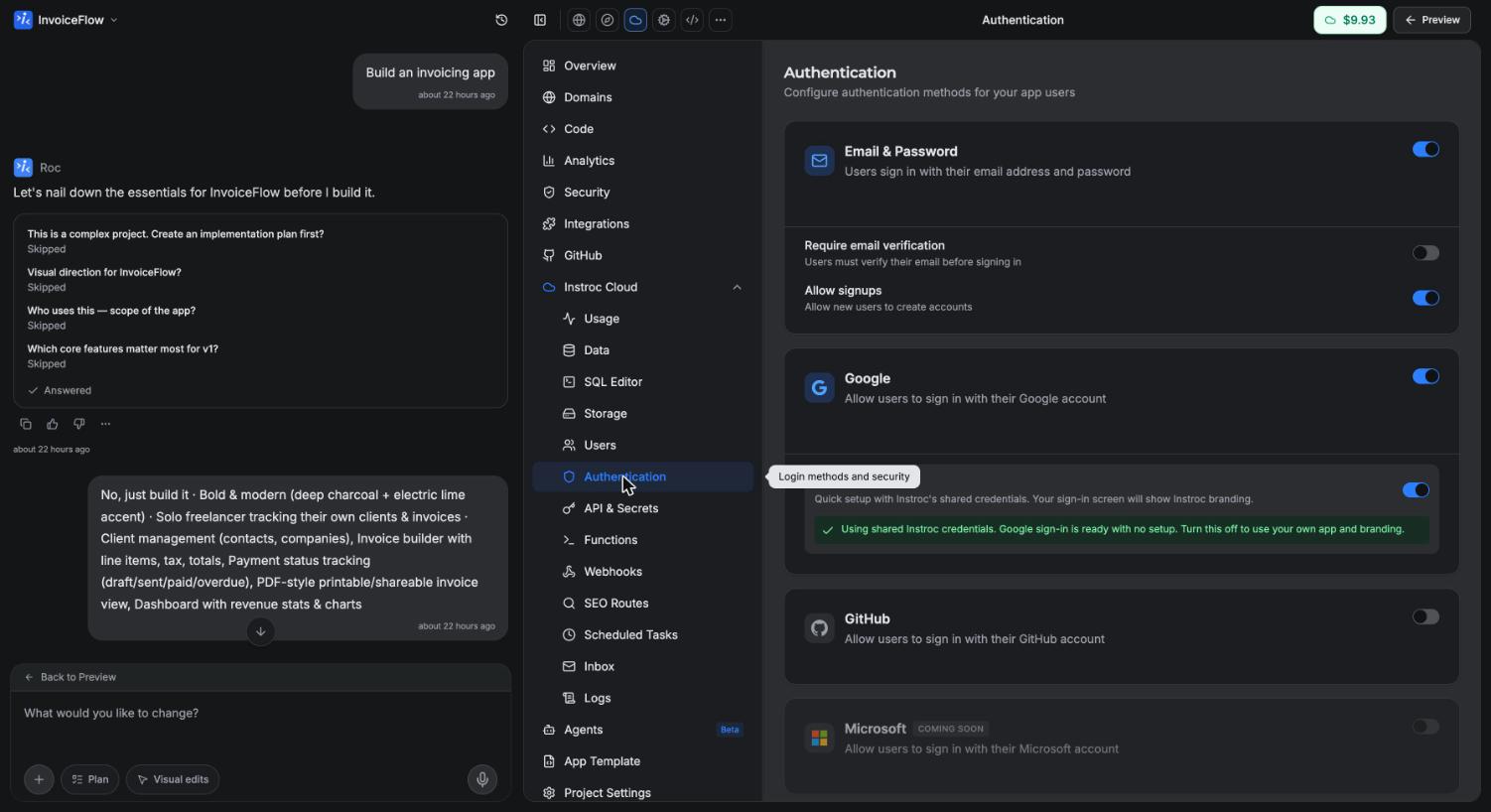
Turning off signups is useful when you want an invite-only or fixed set of users: existing accounts keep working, but nobody new can register. Requiring verification is a good default for apps where you will email users later, since it guarantees every address is real.
The Users panel
The Users panel lists everyone who has created an account in your app, with their email and profile details. It is the quickest way to answer "who is actually using this?" and to check that a signup flow works end to end. These are your app's users, not Instroc users; someone signing up for your app does not need an Instroc account.
Private apps vs in-app accounts
These two features sound similar but solve different problems, and it is worth keeping them straight.
Private publishing gates your whole app. When you publish an app as Private, only members of your workspace can open it, and they sign in with their Instroc account. Nothing inside the app changes; the door to the entire app is simply locked. Private publishing is a paid-plan feature, covered in Publishing.
In-app authentication is for your app's own audience. The app is reachable by anyone, and it has its own signup and login so your users get their own accounts, their own data, and their own sessions. That is what this page describes.
You can combine them, for example an internal tool that is both private to your workspace and has per-user data, but most apps use one or the other.
Sessions are handled for you
When someone signs in, their session is stored in secure, HttpOnly cookies and refreshed automatically. Your app's code never touches tokens, and nothing sensitive is kept in the browser's local storage. Signing out clears the session. You do not write any of this logic; it comes with the platform.
What Roc builds for you
When authentication is part of your app, Roc generates the pages around it: a login page, a signup page, and the states between them (verification code entry when required, forgot-password, and reset). Social sign-in is rendered with the OAuthButtons component, which automatically shows one button for each provider you have enabled, so toggling GitHub on in the panel makes the button appear without a code change.
Ask Roc for the behavior you want in plain language, for example "require an account to leave a review" or "add Google sign-in". Roc wires the pages, the guards, and the database rules together.
Developers who want the exact hooks, methods, and components should see the Authentication API reference.