What is Instroc?
Instroc is a platform for building and running complete web apps by describing them. This page explains how building with Roc actually works, what every app includes out of the box, and how Instroc compares to site builders and to writing code by hand. It also covers, honestly, what Instroc is not.
How building with Roc works
You start by describing your app in the prompt box on the dashboard. That single description is enough; there is no setup form. Instroc creates the project immediately and opens the editor, where Roc, the AI builder, takes over the conversation.
Before writing anything, Roc asks two to four quick questions on a card above the chat: things like your app's name, the visual style you want (for example "Elegant & minimal" or "Bold & playful"), and any functional decisions your description left open. You can answer them, skip individual ones, or skip the whole thing. Saying "just build it" works too. For complex requests, Roc may offer to write an implementation plan first so you can review the approach before any code exists. You can also ask for this yourself at any time with the Plan toggle, labeled "Plan first, then implement".
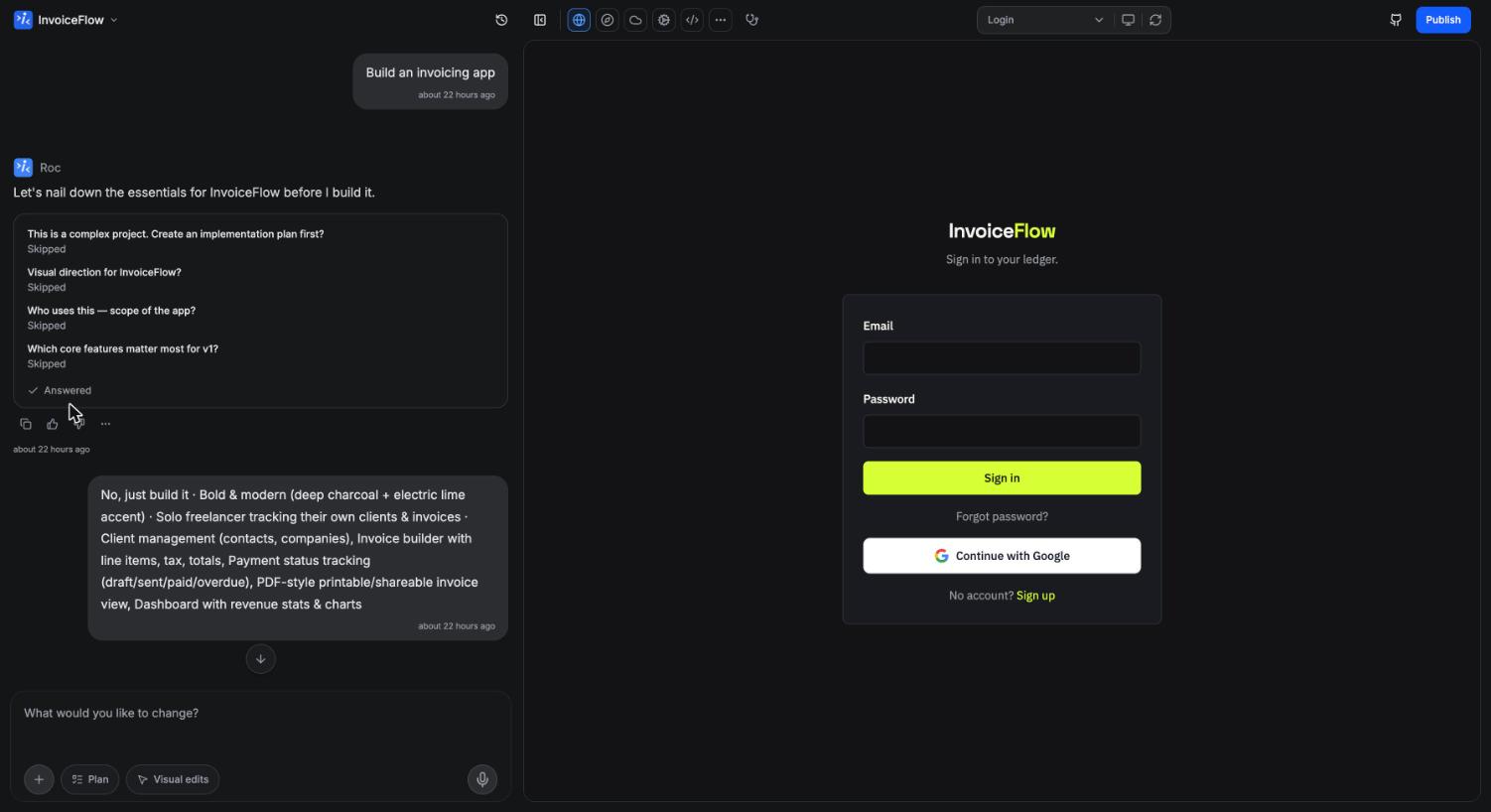
Then Roc builds. New apps are generated as complete, multi-page products with a deliberate design: a committed color palette, a distinctive font pairing, and mobile-first layouts. Roc works in batches, editing many files per pass, and when a batch finishes the app is rebuilt and the preview refreshes. A rebuild usually takes a few seconds.
From there, you refine in conversation. Ask for a new page, a pricing change, a warmer color scheme, or a fix, and Roc makes targeted edits without restyling things you did not ask about. Every message becomes a version you can preview and restore, so experimenting is safe. See Editor overview for the full tour.
What every app includes
An Instroc app is a full product, not just a frontend. Each project comes with:
- Frontend: a modern, responsive web app built with React, TypeScript, and Tailwind.
- Database: your app's own SQL database for records like orders, posts, or customers. See Database.
- Authentication: email and password sign-in plus Google and GitHub sign-in, with no configuration. See Authentication.
- File storage: public and private buckets for images, documents, and uploads. See Storage.
- Serverless functions: backend logic for things like sending email, processing payments, or scheduled jobs. See the backend overview.
- Inbox: contact, feedback, and waitlist submissions land in a built-in inbox, and you get an email automatically.
- Analytics: visitor stats on every published app, included on every plan. See Analytics.
Roc enables Instroc Cloud automatically when your request needs data or sign-in, so you rarely think about the backend as a separate step.
How Instroc differs from site builders
Traditional site builders are great at pages but stop at the backend. When your idea needs accounts, saved data, or payments, you end up wiring together external services yourself. Instroc apps carry their own database, authentication, storage, and functions, so a booking system or client portal is as natural to build as a landing page.
The building model differs too. Instead of arranging blocks on a canvas, you describe outcomes and Roc writes real application code. You can still make precise tweaks by hand: the Visual edits mode lets you click any element in the preview and change its text, colors, spacing, or typography directly.
How Instroc differs from coding by hand
If you can code, Instroc removes the parts that eat weekends: project scaffolding, auth flows, database plumbing, hosting, and deployment. You still get real code. You can open the code editor, download the project as a ZIP, sync it to GitHub, and on paid plans edit files directly, with each save rebuilding the preview.
Who it is for
Instroc suits founders validating an idea, freelancers shipping client work, small businesses that need a portal or booking flow, and developers who want a product live this week rather than this quarter. If your app fits the shape of pages plus data plus users, it fits Instroc.
What Instroc is not
A few honest boundaries, so you know what you are choosing:
- Not a drag-and-drop page builder. You build by describing changes and by clicking elements to edit their properties, not by dragging blocks around a canvas.
- Not a code sandbox. Instroc is for shipping real products, not for running arbitrary experiments. Your apps run on Instroc Cloud, Instroc's managed hosting and backend, rather than on infrastructure you bring yourself.
- Not instant. The preview reflects a real built app. Changes appear after a rebuild, usually within seconds, occasionally a minute or two.
If that sounds right, the Quickstart takes you from a blank prompt to a live URL.